On October 27, 2025, Google rolled out Query Groups inside Search Console Insights an AI-driven way to cluster related search queries into intent-based topic groups so content teams can act faster and with more clarity. Instead of analyzing long lists of near-duplicate keywords, Query Groups surface the topics users actually care about and reveal which topic clusters are gaining traction. If you manage content or SEO, this feature will help you move from keyword noise to strategic action.
What are Query Groups?
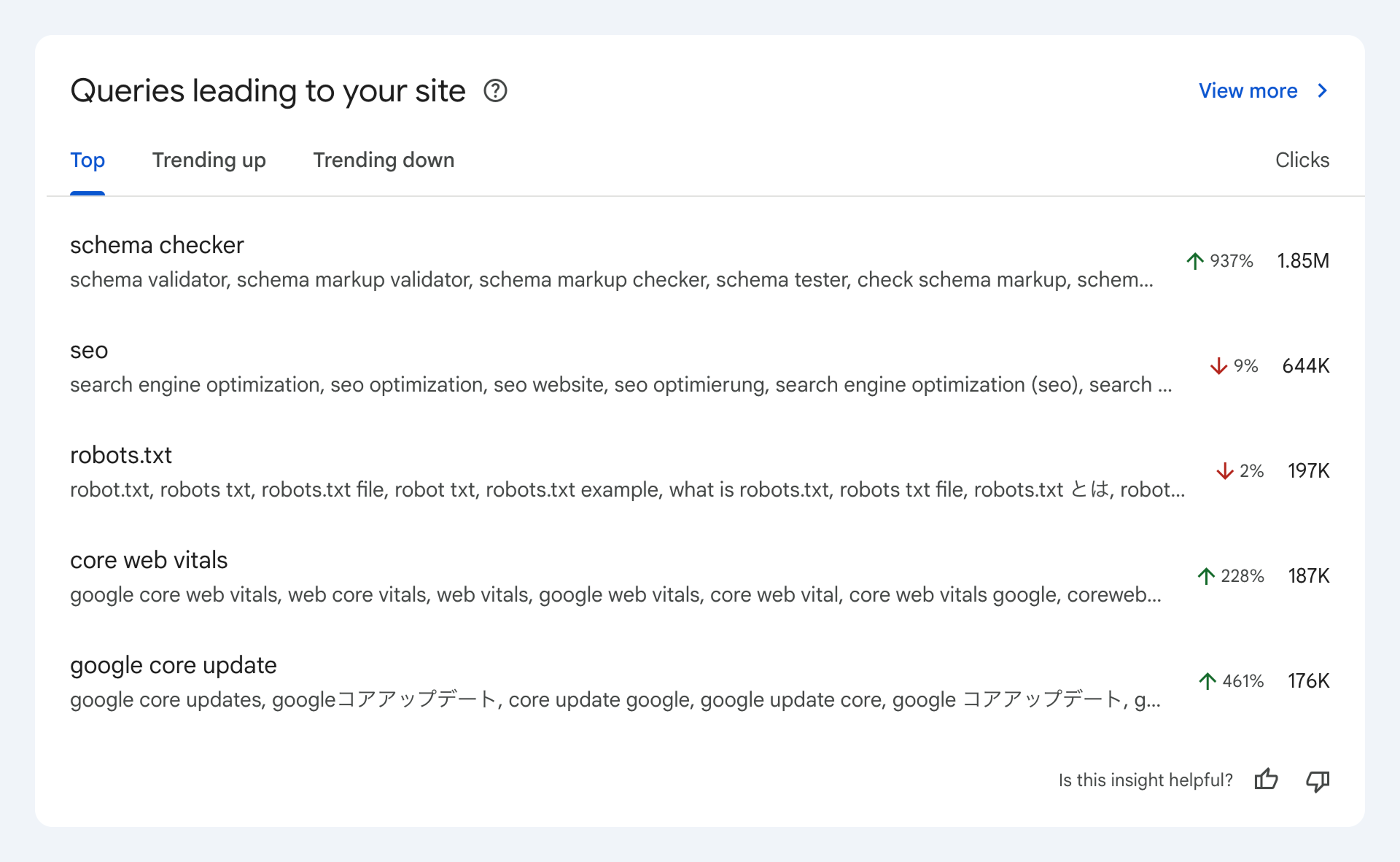
Query Groups automatically cluster related search queries including synonyms, variations, and close misspellings into higher-level topic groups. For example, queries such as “printer setup for small business”, “best small business printers”, and “office printer setup” might be grouped together under a single topic like “business printer setup”. These groups are surfaced inside Search Console Insights so you can quickly review group-level clicks, impressions, and trend signals instead of combing through hundreds of individual query rows.
Why Query Groups matter
For years, SEOs have struggled with noisy, fragmented query lists that make it hard to prioritise work. Query Groups address three big problems:
Clarity — Topic clusters show the big picture, so you don’t miss the intent behind many similar keywords.
Speed — You spend less time manual-grouping data and more time executing on optimization.
Actionability — Group-level data helps you choose actionable tactics like pillar page creation, metadata optimization, and internal linking.
Query Groups are a practical way to align your content strategy to search intent, rather than chasing single-keyword fluctuations.
Where to find Query Groups
You’ll find Query Groups inside the Search Console Insights dashboard for properties that have the feature enabled. The Query Groups card shows group names, aggregate clicks and impressions, and trend indicators (up/down). Click a group to see the underlying queries and the top pages ranking for that group. If you want to combine search visibility with on-site behavior, export the underlying queries and blend them with metrics from Google Analytics 4 (GA4) or build a dashboard in Looker Studio.
How to use Query Groups practical tactics
Here are concrete ways to turn grouped insights into traffic and conversions:
Prioritise topic-first updates. When a Query Group has high impressions but low clicks, update titles, meta descriptions, and page snippets on the highest-impression pages to better match intent.
Create pillar & cluster content. Use groups to identify topics that deserve a pillar page and supporting cluster articles; this improves topical authority.
Consolidate fragmented pages. If multiple pages rank for the same group, consider merging or canonicalizing to concentrate ranking signals.
Improve internal linking. Link supporting cluster pages to the pillar page with anchor text that reflects the Query Group label.
Spot content opportunities. Groups with rising impressions but few pages ranking indicate content gaps you can quickly fill.
Real-world example: from group to growth
Suppose a Query Group titled “home office printer setup” shows increasing impressions but low CTR:
Inspect the group to see the specific queries and top-ranking pages.
Update the top page’s title and meta to match the primary intent: “Home Office Printer Setup Step-by-Step Guide”.
Add a concise FAQ matching the common user questions inside that group.
Publish two supporting posts such as “Best Budget Home Office Printers” and “Wi-Fi Printer Setup for Home Office”, then link them to the main guide.
Monitor the Query Group in Search Console Insights and measure engagement in GA4.
Limitations & things to watch
Rollout & availability: Google is rolling Query Groups out progressively; higher-volume properties are prioritized, so you may not see it immediately.
Grouping accuracy: Because groups are AI-driven, early group labels may be imperfect for niche topics or mixed-language queries. Treat groups as investigative starting points.
Not a replacement for Performance reports: Query Groups complement, but don’t replace, the granular views and exports available in the full Search Console Performance report.
Integrating the Google Search Console Query Groups Feature into Your Reporting Stack
The Google Search Console Query Groups feature is surfaced directly within Insights, but its real value comes when you integrate these grouped insights into your wider analytics and reporting ecosystem.
- Export query group data from Google Search Console and use it as a reporting dimension in Looker Studio dashboards. This allows you to analyze performance at a topic level instead of tracking hundreds of individual queries.
- Combine Google Search Console query groups with GA4 data to connect search demand with on-site engagement, conversions, and revenue. This integration enables ROI-focused measurement and helps identify which query groups drive meaningful business outcomes.
- Leverage the Google Search Console query groups feature in client and stakeholder reports to simplify data storytelling. Presenting insights such as “Topic clusters X, Y, and Z are driving organic growth” creates a clearer narrative than displaying long lists of individual keywords.
By integrating the Google Search Console query groups feature into your reporting stack, you can deliver more actionable insights, reduce reporting complexity, and make data-driven SEO decisions faster.
Best-practice checklist
Check Query Groups weekly for newly emerging topics.
Prioritise groups with high impressions + low CTR, or groups with upward impression trends.
Use group labels to plan pillar pages and internal linking structures.
Reassess grouped content after 4–8 weeks to measure ranking and engagement changes.
Blend Search Console Insights with GA4 to ensure SEO work affects business KPIs.
Final thoughts
Query Groups shift the focus from keyword-level firefighting to topic-level strategy helping teams prioritize content that aligns with user intent and business goals. Use the group insights as a starting point to build pillar content, improve on-page metadata, and measure real business impact by blending the groups with GA4 metrics. Ready to turn your Query Groups into a 90-day content plan? Share the top groups you see and I’ll map them to pillar pages, supporting posts, and quick wins you can implement this week.